Vue项目中安装插件ffmpeg 0.12.x
1.安装
TIP
bash
npm install @ffmpeg/ffmpeg @ffmpeg/util @ffmpeg/core2.把ffmpeg安装到项目里
在@ffmpeg/core/dist/esm里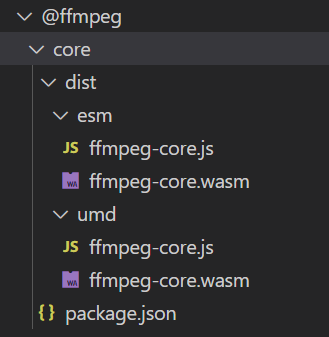
复制到项目代码的public目录里
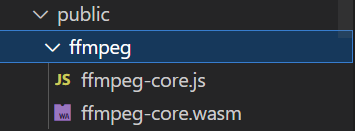
核心示例
js
import { FFmpeg } from "@ffmpeg/ffmpeg";
import { fetchFile, toBlobURL } from "@ffmpeg/util";

const ffmpeg = new FFmpeg();


const videoURL =
  "https://raw.githubusercontent.com/ffmpegwasm/testdata/master/video-15s.avi"; //远程视频地址

// 加载 ffmpeg 核心
const transcode = async () => {
  ffmpeg.on("log", (e) => {
    console.log(e.message);
  });

  //coreURL 和 wasmURL 加载核心包 GitHub文档仓库的示例是加载CDN的,我们可以把包放到public目录
  let coreURL = await toBlobURL("/public/ffmpeg/ffmpeg-core.js", "text/javascript");
  let wasmURL = await toBlobURL(`/public/ffmpeg/ffmpeg-core.wasm`, "application/wasm");
  await ffmpeg.load({
    coreURL,
    wasmURL,
  });

  await ffmpeg.writeFile("test.avi", await fetchFile(videoURL)); //将远程视频写入FFmpeg文件系统
  await ffmpeg.exec(["-i", "test.avi", "test.mp4"]); //FFmpeg输出视频
  const data = await ffmpeg.readFile("test.mp4"); // 读取生成的视频文件
  const videoBlob = new Blob([videoData.buffer], { type: "video/mp4" });
  videoSrc = URL.createObjectURL(videoBlob); // 返回视频Blob的URL,可用于video标签的src属性
};
封装的工具类
- 视频转码 transcodeVideo
- 视频转GIF transcodeToGif
ffmpegUtil.js
js
// ffmpegUtil.js
// ffmpegUtil.js
import { FFmpeg } from "@ffmpeg/ffmpeg";
import { fetchFile, toBlobURL } from "@ffmpeg/util";

export class FFmpegUtil {
  /**
   * 构造函数
   * @param {string} coreURL ffmpeg-core.js路径
   * @param {string} wasmURL ffmpeg-core.wasm路径
   * @param {function} logCallback 日志回调函数
   * @param {function} statusCallback 状态回调函数
   */
  constructor(
    coreURL = 'https://cdn.jsdelivr.net/npm/@ffmpeg/core@0.12.6/dist/esm/ffmpeg-core.js',
    wasmURL = 'https://cdn.jsdelivr.net/npm/@ffmpeg/core@0.12.6/dist/esm/ffmpeg-core.wasm',
    logCallback = null,
    statusCallback = null
  ) {
    this.ffmpeg = new FFmpeg();
    this.isLoaded = false;
    this.status = 'idle'; // idle, loading, processing, completed, error
    this.logCallback = logCallback;
    this.statusCallback = statusCallback;
    this.coreURL = coreURL;
    this.wasmURL = wasmURL;

    // 监听FFmpeg日志
    this.ffmpeg.on('log', (e) => {
      this.handleLog(e.message);
    });
  }

  /**
   * 设置日志回调
   * @param {function} callback 日志回调函数
   */
  setLogCallback(callback) {
    this.logCallback = callback;
  }

  /**
   * 设置状态回调
   * @param {function} callback 状态回调函数
   */
  setStatusCallback(callback) {
    this.statusCallback = callback;
  }

  /**
   * 处理日志
   * @param {string} message 日志信息
   */
  handleLog(message) {
    console.log('[FFmpeg]', message);
    if (this.logCallback && typeof this.logCallback === 'function') {
      this.logCallback(message);
    }
  }

  /**
   * 更新状态
   * @param {string} status 新状态
   * @param {string} message 附加消息
   */
  updateStatus(status, message = '') {
    this.status = status;
    console.log('[FFmpeg Status]', status, message);
    if (this.statusCallback && typeof this.statusCallback === 'function') {
      this.statusCallback(status, message);
    }
  }

  /**
   * 加载FFmpeg核心
   * @returns {Promise<boolean>} 是否加载成功
   */
  async load() {
    if (this.isLoaded) {
      this.handleLog('FFmpeg already loaded');
      return true;
    }

    try {
      this.updateStatus('loading', 'Loading FFmpeg core...');

      // 转换URL为Blob URL
      const coreBlobURL = await toBlobURL(this.coreURL, 'text/javascript');
      const wasmBlobURL = await toBlobURL(this.wasmURL, 'application/wasm');

      // 加载核心文件
      await this.ffmpeg.load({
        coreURL: coreBlobURL,
        wasmURL: wasmBlobURL,
      });

      this.isLoaded = true;
      this.updateStatus('idle', 'FFmpeg loaded successfully');
      return true;
    } catch (error) {
      const errorMsg = error instanceof Error ? error.message : String(error);
      this.handleLog(`Load error: ${errorMsg}`);
      this.updateStatus('error', `Failed to load FFmpeg: ${errorMsg}`);
      return false;
    }
  }

  /**
   * 将文件写入FFmpeg虚拟文件系统
   * @param {string} filename 文件名
   * @param {string|File|Blob} file 文件(URL、File或Blob)
   * @returns {Promise<boolean>} 是否写入成功
   */
  async writeFile(filename, file) {
    try {
      this.handleLog(`Writing file: ${filename}`);
      const data = await fetchFile(file);
      await this.ffmpeg.writeFile(filename, data);
      return true;
    } catch (error) {
      const errorMsg = error instanceof Error ? error.message : String(error);
      this.handleLog(`Write file error: ${errorMsg}`);
      this.updateStatus('error', `Failed to write file: ${errorMsg}`);
      return false;
    }
  }

  /**
   * 从FFmpeg虚拟文件系统读取文件
   * @param {string} filename 文件名
   * @returns {Promise<Uint8Array|null>} 文件数据
   */
  async readFile(filename) {
    try {
      this.handleLog(`Reading file: ${filename}`);
      const data = await this.ffmpeg.readFile(filename);
      return data;
    } catch (error) {
      const errorMsg = error instanceof Error ? error.message : String(error);
      this.handleLog(`Read file error: ${errorMsg}`);
      this.updateStatus('error', `Failed to read file: ${errorMsg}`);
      return null;
    }
  }

  /**
   * 执行FFmpeg命令
   * @param {string[]} args 命令参数数组
   * @returns {Promise<number[]>} 命令执行结果
   */
  async exec(args) {
    try {
      this.updateStatus('processing', `Executing command: ffmpeg ${args.join(' ')}`);
      const result = await this.ffmpeg.exec(args);
      this.updateStatus('idle', 'Command executed successfully');
      return result;
    } catch (error) {
      const errorMsg = error instanceof Error ? error.message : String(error);
      this.handleLog(`Command error: ${errorMsg}`);
      this.updateStatus('error', `Command failed: ${errorMsg}`);
      throw error;
    }
  }

  /**
   * 视频转码
   * @param {string|File|Blob} inputFile 输入文件(URL、File或Blob)
   * @param {string} inputFilename 输入文件名
   * @param {string} outputFilename 输出文件名
   * @param {string[]} options 转码选项
   * @returns {Promise<string|null>} 转码后的Blob URL
   */
  async transcodeVideo(
    inputFile,
    inputFilename = 'input',
    outputFilename = 'output.mp4',
    options = ['-c:v', 'libx264', '-crf', '23', '-c:a', 'aac', '-strict', 'experimental']
  ) {
    try {
      // 确保FFmpeg已加载
      if (!await this.load()) {
        return null;
      }

      this.updateStatus('processing', 'Starting video transcoding...');

      // 写入输入文件
      if (!await this.writeFile(inputFilename, inputFile)) {
        return null;
      }

      // 执行转码命令
      await this.exec(['-i', inputFilename, ...options, '-y', outputFilename]);

      // 读取输出文件
      const outputData = await this.readFile(outputFilename);
      if (!outputData) {
        return null;
      }

      // 创建Blob URL
      let mimeType = 'video/*';
      if (outputFilename.endsWith('.mp4')) {
        mimeType = 'video/mp4';
      } else if (outputFilename.endsWith('.webm')) {
        mimeType = 'video/webm';
      } else if (outputFilename.endsWith('.avi')) {
        mimeType = 'video/avi';
      }

      const blob = new Blob([outputData.buffer], { type: mimeType });
      const url = URL.createObjectURL(blob);

      this.updateStatus('completed', 'Video transcoding completed');
      return url;
    } catch (error) {
      const errorMsg = error instanceof Error ? error.message : String(error);
      this.updateStatus('error', `Transcoding failed: ${errorMsg}`);
      return null;
    }
  }

  /**
     * 视频转GIF(修复尺寸计算问题)
     * @param {string|File|Blob} inputFile 输入视频文件
     * @param {string} inputFilename 输入文件名(带后缀)
     * @param {string} outputFilename 输出GIF文件名(默认output.gif)
     * @param {Object} gifOptions GIF配置(帧率、尺寸、质量)
     * @returns {Promise<string|null>} GIF的Blob URL
     */
  async transcodeToGif(
    inputFile,
    inputFilename = 'input.mp4',
    outputFilename = 'output.gif',
    gifOptions = {
      fps: 10,          // GIF帧率(10-15最佳)
      width: 640,       // 目标宽度(固定)
      quality: 8,       // 质量(1-31,越小越清晰)
      maxDuration: 60 * 60 * 10,   // 最大时长(秒,避免GIF过大)
      originalWidth: 800, // 新增:从组件传递的宽
      originalHeight: 600 // 新增:从组件传递的高
    }
  ) {
    try {
      // 确保FFmpeg已加载
      if (!await this.load()) {
        return null;
      }

      this.updateStatus('processing', 'Starting video to GIF conversion...');

      // 1. 写入输入文件到虚拟文件系统
      if (!await this.writeFile(inputFilename, inputFile)) {
        return null;
      }

      const originalWidth = gifOptions.originalWidth;
      const originalHeight = gifOptions.originalHeight;
      this.handleLog(`使用从视频文件获取的尺寸: ${originalWidth}x${originalHeight}`);
      // 2. 按比例计算GIF尺寸(保持宽高比)
      const targetWidth = gifOptions.width > 0 ? gifOptions.width : originalWidth;
      const targetHeight = Math.round((targetWidth * originalHeight) / originalWidth);
      const finalHeight = Math.max(targetHeight, 1);
      this.handleLog(`目标GIF尺寸: ${targetWidth}x${finalHeight}`);


      // 4. 构建GIF转码命令(无 -1 动态尺寸,用具体宽高)
      const ffmpegArgs = ['-i', inputFilename];

      // 可选:限制GIF时长(避免体积过大)
      if (gifOptions.maxDuration > 0) {
        ffmpegArgs.push('-t', gifOptions.maxDuration.toString());
      }

      // GIF核心参数(无 -1 语法)
      ffmpegArgs.push(
        '-an',                     // 去除音频(GIF不支持音频)
        '-r', gifOptions.fps.toString(),  // 控制GIF帧率(平衡流畅度和体积)
        '-s', `${targetWidth}x${finalHeight}`, // 具体尺寸(修复错误的关键)
        '-qscale:v', gifOptions.quality.toString(),  // GIF质量(值越小越清晰)
        '-loop', '0',              // 无限循环(0=无限,1=1次循环,以此类推)
        '-y',                      // 覆盖已有文件(避免手动删除)
        outputFilename             // 输出GIF文件名
      );

      // 5. 执行转码命令
      await this.exec(ffmpegArgs);

      // 6. 读取GIF文件并生成Blob URL
      const gifData = await this.readFile(outputFilename);
      if (!gifData) {
        this.handleLog('Failed to read GIF file');
        return null;
      }

      // GIF的MIME类型为 image/gif
      const gifBlob = new Blob([gifData.buffer], { type: 'image/gif' });
      const gifUrl = URL.createObjectURL(gifBlob);

      this.updateStatus('completed', 'Video to GIF conversion completed');
      return gifUrl;
    } catch (error) {
      const errorMsg = error instanceof Error ? error.message : String(error);
      this.updateStatus('error', `GIF conversion failed: ${errorMsg}`);
      return null;
    }
  }

  /**
   * 释放资源
   */
  destroy() {
    this.handleLog('Destroying FFmpeg instance');
    this.ffmpeg.terminate();
    this.isLoaded = false;
    this.updateStatus('idle', 'FFmpeg instance destroyed');
  }

  /**
   * 获取当前状态
   * @returns {string} 当前状态
   */
  getStatus() {
    return this.status;
  }

  /**
   * 检查是否已加载
   * @returns {boolean} 是否准备就绪
   */
  isReady() {
    return this.isLoaded && this.status !== 'error';
  }
}

// 创建默认实例
export const defaultFFmpeg = new FFmpegUtil();
vue
html
<template>
  <div class="transcoder-container">
    <div class="input-section">
      <h3>视频转码工具</h3>
      <!-- 1. 新增:转码类型选择(MP4/GIF) -->
      <div class="convert-type">
        <label>转码类型:</label>
        <select v-model="convertType" class="type-select" :disabled="isProcessing">
          <option value="mp4">视频转MP4</option>
          <option value="gif">视频转GIF</option>
        </select>
      </div>

      <!-- 原有文件选择 -->
      <input
        type="file"
        accept="video/*"
        @change="handleFileSelect"
        class="file-input"
        :disabled="isProcessing"
      />

      <!-- 原有按钮 -->
      <button
        @click="startTranscoding"
        :disabled="!isReady || isProcessing || !videoFile"
        class="transcode-btn"
      >
        {{
          isProcessing
            ? `正在${convertType === "mp4" ? "转MP4" : "转GIF"}...`
            : `开始${convertType === "mp4" ? "转MP4" : "转GIF"}`
        }}
      </button>
      <button @click="reset" :disabled="!isProcessing && !outputSrc" class="reset-btn">
        重置
      </button>
    </div>

    <!-- 原有状态区域 -->
    <div class="status-section">
      <div class="status-label">状态:</div>
      <div class="status-message">{{ statusMessage }}</div>
    </div>

    <!-- 原有日志区域 -->
    <div class="logs-section" v-if="showLogs">
      <div class="logs-header">
        <span>日志</span>
        <button @click="toggleLogs" class="toggle-btn" :disabled="isProcessing">
          {{ showLogs ? "隐藏" : "显示" }}
        </button>
      </div>
      <div class="logs-content" v-if="showLogs">
        <p v-for="(log, index) in logs" :key="index" class="log-item">{{ log }}</p>
      </div>
    </div>

    <!-- 2. 优化输出区域:根据类型显示视频/GIF -->
    <div class="output-section" v-if="outputSrc">
      <h4>转码结果 ({{ convertType === "mp4" ? "MP4视频" : "GIF动图" }}) :</h4>

      <!-- MP4显示video标签,GIF显示img标签 -->
      <video
        v-if="convertType === 'mp4'"
        :src="outputSrc"
        controls
        class="output-media"
      />
      <img
        v-else
        :src="outputSrc"
        class="output-media"
        alt="转码后的GIF"
        style="max-width: 100%; border: 1px solid #eee"
      />

      <!-- 3. 适配下载:文件名和MIME类型 -->
      <a
        :href="outputSrc"
        :download="`transcoded-${Date.now()}.${convertType}`"
        class="download-link"
      >
        下载{{ convertType === "mp4" ? "MP4视频" : "GIF动图" }}
      </a>
    </div>
  </div>
</template>

<script setup>
import { ref, onMounted, onUnmounted } from "vue";
import { FFmpegUtil } from "./ffmpegUtil";

// 4. 状态变量优化:新增转码类型和通用输出URL
const videoFile = ref(null);
const videoDimensions = ref({ width: 800, height: 600 }); // 存储视频宽高
const outputSrc = ref(""); // 替代原videoSrc,支持MP4/GIF
const logs = ref([]);
const statusMessage = ref("准备就绪");
const isProcessing = ref(false);
const isReady = ref(false);
const showLogs = ref(true);
const convertType = ref("gif"); // 转码类型:mp4/gif

// 创建FFmpeg实例(原有逻辑)
const ffmpeg = new FFmpegUtil("/ffmpeg/ffmpeg-core.js", "/ffmpeg/ffmpeg-core.wasm");

// 原有文件选择逻辑(保留)
const handleFileSelect = (e) => {
  const target = e.target;
  if (target.files && target.files[0]) {
    videoFile.value = target.files[0];
    statusMessage.value = `已选择文件: ${target.files[0].name}`;
    outputSrc.value = "";

    // 关键:通过Video API获取尺寸
    const video = document.createElement("video");
    video.preload = "metadata"; // 仅加载元数据(不加载完整视频)
    video.onloadedmetadata = () => {
      // 获取原始宽高(忽略旋转等变换,取实际像素尺寸)
      const originalWidth = video.videoWidth;
      const originalHeight = video.videoHeight;

      if (originalWidth > 0 && originalHeight > 0) {
        videoDimensions.value = { width: originalWidth, height: originalHeight };
        statusMessage.value = `已选择文件: ${target.files[0].name} (尺寸: ${originalWidth}x${originalHeight})`;
      } else {
        statusMessage.value = `已选择文件: ${target.files[0].name} (无法获取尺寸,使用默认值)`;
      }

      // 清理临时视频元素
      URL.revokeObjectURL(video.src);
    };

    // 加载视频文件(创建临时URL)
    video.src = URL.createObjectURL(videoFile.value);
  }
};

// 原有日志处理(保留)
const handleLog = (message) => {
  logs.value.push(message);
  setTimeout(() => {
    const logContainer = document.querySelector(".logs-content");
    if (logContainer) {
      logContainer.scrollTop = logContainer.scrollHeight;
    }
  }, 0);
};

// 原有状态处理(保留)
const handleStatus = (status, message) => {
  if (message) {
    statusMessage.value = message;
  } else {
    statusMessage.value = status;
  }
  isProcessing.value = status === "processing" || status === "loading";
  isReady.value = status === "idle" || status === "completed";
};

// 5. 核心修改:根据转码类型调用不同方法
const startTranscoding = async () => {
  if (!videoFile.value) {
    statusMessage.value = "请先选择视频文件";
    return;
  }

  logs.value = [];
  outputSrc.value = "";
  const fileExt = videoFile.value.name.split(".").pop() || "mp4";
  const inputFilename = `input.${fileExt}`;

  try {
    if (convertType.value === "mp4") {
      // 原有MP4转码逻辑
      const transcodeOptions = [
        "-c:v",
        "libx264",
        "-crf",
        "23",
        "-c:a",
        "aac",
        "-b:a",
        "128k",
        "-strict",
        "experimental",
      ];
      const resultUrl = await ffmpeg.transcodeVideo(
        videoFile.value,
        inputFilename,
        "output.mp4",
        transcodeOptions
      );
      if (resultUrl) {
        outputSrc.value = resultUrl;
        statusMessage.value = "MP4转码完成,可以播放或下载";
      }
    } else {
      // GIF转码逻辑(调用新增方法)
      const gifOptions = {
        fps: 12, // 12帧/秒(平衡流畅度和体积)
        width: 640, // 固定宽度,高度自适应
        quality: 8, // 质量中等(值越小越清晰)
        maxDuration: 15, // 最大15秒(避免GIF过大)
        originalWidth: videoDimensions.value.width, // 传递原始宽
        originalHeight: videoDimensions.value.height, // 传递原始高
      };
      const resultUrl = await ffmpeg.transcodeToGif(
        videoFile.value,
        inputFilename,
        "output.gif",
        gifOptions
      );
      if (resultUrl) {
        outputSrc.value = resultUrl;
        statusMessage.value = "GIF转码完成,可以预览或下载";
      }
    }
  } catch (error) {
    const errorMsg = error instanceof Error ? error.message : String(error);
    statusMessage.value = `${
      convertType.value === "mp4" ? "MP4" : "GIF"
    }转码失败: ${errorMsg}`;
  }
};

// 6. 重置逻辑优化:清空所有状态
const reset = () => {
  videoFile.value = null;
  outputSrc.value = "";
  logs.value = [];
  statusMessage.value = "准备就绪";
  convertType.value = "mp4"; // 重置为默认转MP4
  const fileInput = document.querySelector(".file-input");
  if (fileInput) fileInput.value = "";
};

// 原有切换日志(保留)
const toggleLogs = () => {
  showLogs.value = !showLogs.value;
};

// 原有挂载/卸载逻辑(保留)
onMounted(() => {
  ffmpeg.setLogCallback(handleLog);
  ffmpeg.setStatusCallback(handleStatus);
  ffmpeg.load().then((loaded) => {
    if (loaded) {
      isReady.value = true;
    }
  });
});

onUnmounted(() => {
  ffmpeg.destroy();
  if (outputSrc.value) {
    URL.revokeObjectURL(outputSrc.value);
  }
});
</script>

<style>
/* 7. 新增转码类型选择的样式 */
.convert-type {
  margin: 1rem 0;
  display: flex;
  align-items: center;
  gap: 0.5rem;
}

.type-select {
  padding: 0.5rem;
  border: 1px solid #ddd;
  border-radius: 4px;
  min-width: 120px;
}

/* 8. 统一媒体预览样式 */
.output-media {
  width: 100%;
  max-width: 800px;
  margin: 1rem 0;
  border-radius: 4px;
  box-shadow: 0 2px 4px rgba(0, 0, 0, 0.1);
}

/* 保留原有样式 ... */
.transcoder-container {
  max-width: 1000px;
  margin: 2rem auto;
  padding: 0 1rem;
  font-family: sans-serif;
}

.input-section {
  margin-bottom: 1.5rem;
  padding: 1rem;
  background-color: #f5f5f5;
  border-radius: 8px;
}

.file-input {
  margin: 1rem 0;
  padding: 0.5rem;
  width: 100%;
}

.transcode-btn {
  background-color: #42b983;
  color: white;
  border: none;
  padding: 0.8rem 1.5rem;
  border-radius: 4px;
  cursor: pointer;
  font-size: 1rem;
  margin-right: 0.5rem;
  transition: background-color 0.3s;
}

.transcode-btn:disabled {
  background-color: #cccccc;
  cursor: not-allowed;
}

.reset-btn {
  background-color: #f44336;
  color: white;
  border: none;
  padding: 0.8rem 1.5rem;
  border-radius: 4px;
  cursor: pointer;
  font-size: 1rem;
  transition: background-color 0.3s;
}

.reset-btn:disabled {
  background-color: #cccccc;
  cursor: not-allowed;
}

.status-section {
  margin-bottom: 1rem;
  padding: 1rem;
  border: 1px solid #e0e0e0;
  border-radius: 8px;
}

.status-label {
  font-weight: bold;
  margin-bottom: 0.5rem;
  color: #666;
}

.status-message {
  color: #333;
  min-height: 1.5rem;
}

.logs-section {
  margin-bottom: 1.5rem;
  border: 1px solid #e0e0e0;
  border-radius: 8px;
  overflow: hidden;
}

.logs-header {
  display: flex;
  justify-content: space-between;
  align-items: center;
  padding: 0.8rem;
  background-color: #f0f0f0;
  border-bottom: 1px solid #e0e0e0;
}

.toggle-btn {
  background: none;
  border: none;
  color: #42b983;
  cursor: pointer;
  text-decoration: underline;
}

.logs-content {
  padding: 1rem;
  max-height: 300px;
  overflow-y: auto;
  font-family: monospace;
  font-size: 0.9rem;
  background-color: #fafafa;
}

.log-item {
  margin: 0.3rem 0;
  padding: 0.2rem 0;
  color: #333;
}

.log-item:nth-child(odd) {
  background-color: #f0f0f0;
}

.output-section {
  margin-top: 1.5rem;
  padding: 1rem;
  border: 1px solid #e0e0e0;
  border-radius: 8px;
}

.download-link {
  display: inline-block;
  margin-top: 1rem;
  color: #2196f3;
  text-decoration: none;
  padding: 0.5rem 1rem;
  border: 1px solid #2196f3;
  border-radius: 4px;
  transition: background-color 0.3s, color 0.3s;
}

.download-link:hover {
  background-color: #2196f3;
  color: white;
}
</style>